| Audience | How you'll use this article |
|---|---|
| Marketing | Understand what AI Decisioning does, how agents work, and how to set up your first adaptive campaign. |
| Data teams | Understand what data AI Decisioning needs, how to configure your workspace, and how agents connect to destinations. |
AI Decisioning (AID) automates campaign decisions at the individual user level. You define agents that combine an audience, goals, and messages — then AID learns which message, channel, and timing perform best for each person.
What you'll learn
- What AI Decisioning is and what problems it solves
- How agents work
- Core components
- How to get started, by role
- When to use AI Decisioning
- How AI Decisioning connects to other Hightouch products
Overview
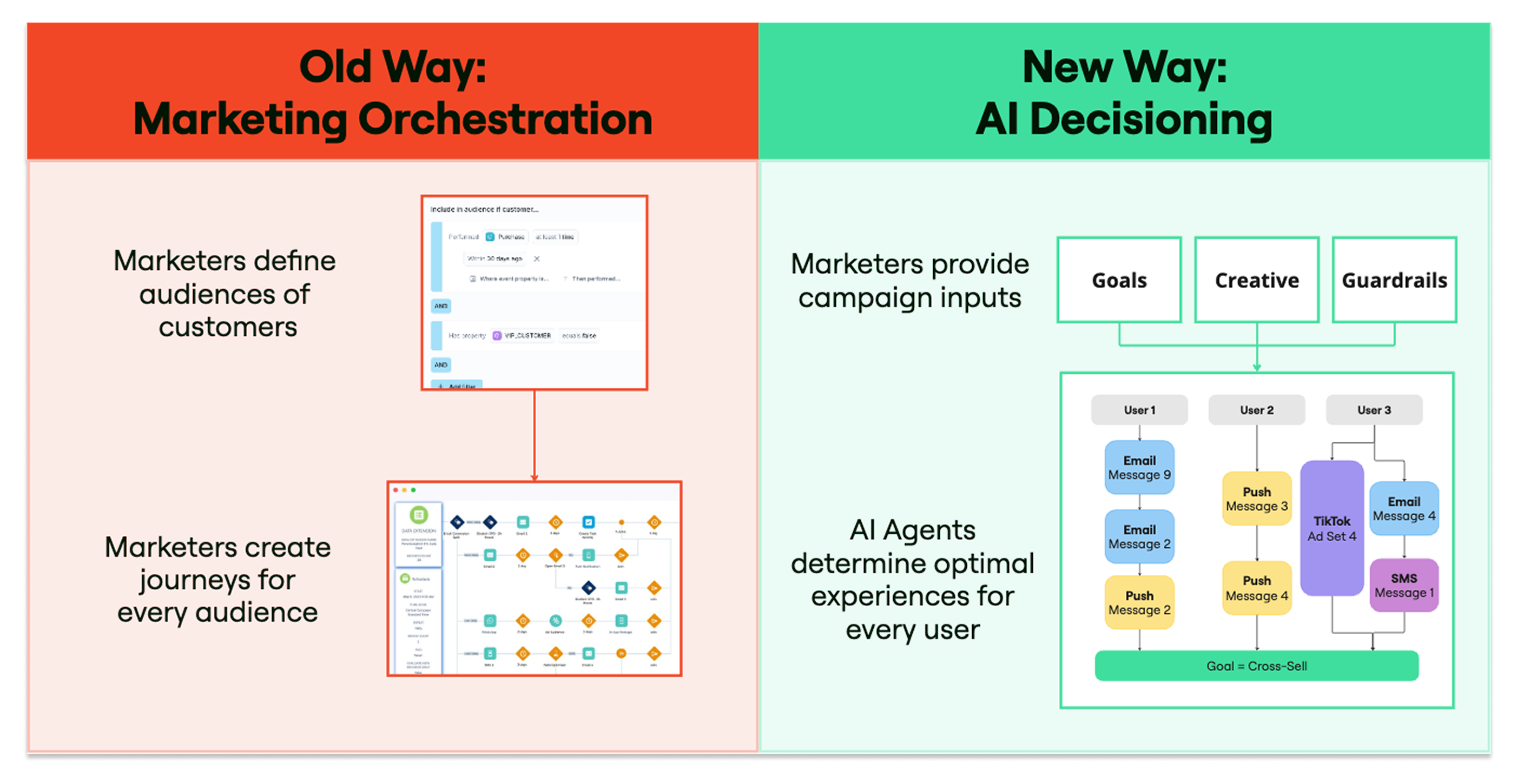
Most lifecycle campaigns are built with static rules: if a user does X, send message Y. That can work for simple campaigns, but it becomes harder to manage as audiences, messages, and channels increase.
AI Decisioning uses event data to learn which messages, channels, and timing work best for each user. Instead of writing rules for every scenario, you define what success looks like — purchases, sign-ups, engagement — and AID uses performance data to choose the message, channel, and timing for each person.
The core unit is an agent. Each agent combines everything a campaign needs to learn and improve: an audience, goals, messages, scheduling rules, and guardrails. Once running, the agent uses event data as feedback and continuously adjusts which messages, channels, and timing it uses.
Agents operate entirely within the inputs and rules you define. They don't create new content or act outside your configuration.
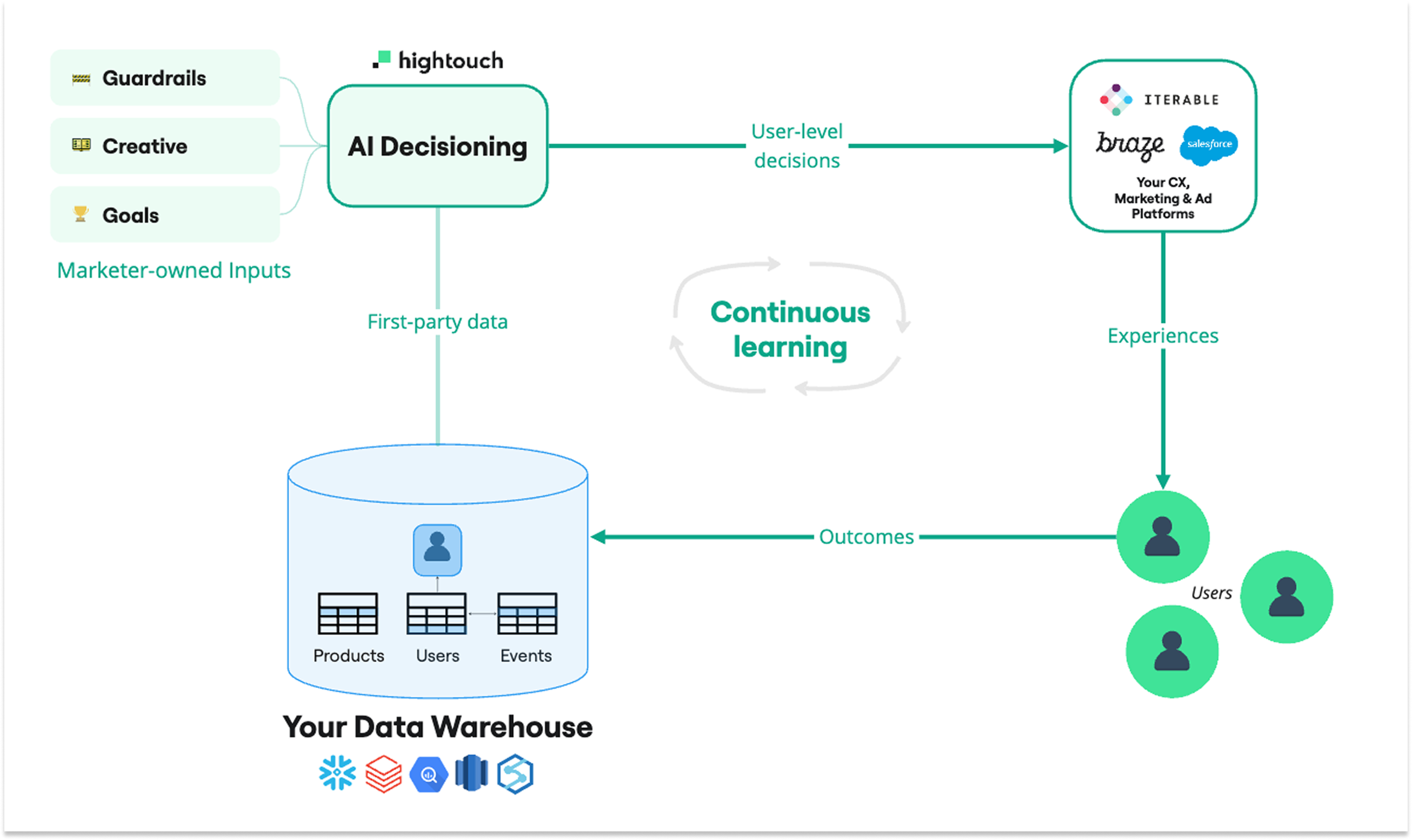
Explore the interactive architecture diagram — see how data flows and where AI Decisioning fits in your stack.
Example: Onboarding campaign that learns what converts
You want new users to complete their first purchase within 14 days of signing up. Instead of building a fixed drip sequence, you create an agent with a "first purchase" goal, add several message variants across email and push, and let AID decide which variant and channel each user gets. Over time, the agent learns that discount-forward messages work better for price-sensitive segments while product-focused messages convert power users — without you writing rules for each case.
Example: Win-back campaign with smart suppression
Lapsed users haven't engaged in 60 days. You create an agent targeting that audience with a re-engagement goal, add variants with different incentive levels, and enable Smart Suppression to skip users unlikely to respond. AID learns which incentive level and channel re-activates each type of user, while suppression reduces wasted sends.
How agents work
Each agent follows a continuous loop:
- Collect inputs — Audience, goals, messages, and guardrails.
- Decide — Which message to send, when, and through which channel.
- Deliver — Send through your connected destinations (Braze, Iterable, Salesforce Marketing Cloud).
- Measure — Record outcomes such as purchases or clicks.
- Learn — Update future decisions based on what worked.
This process runs automatically for every user. AID uses reinforcement learning to balance exploration (testing new options) with optimization (sending what performs best). Unlike static rules or journeys, AID adjusts automatically to seasonality, creative changes, and audience behavior shifts.
Core components
Agents and messages
Agents are the foundation — each one combines an audience, goals, and messages into a single adaptive campaign. After creating an agent, add messages sourced from your destination (Braze, Iterable, or SFMC) and define variants the agent can evaluate. Use tags to label messages by creative theme, offer type, or content category so you can compare performance across dimensions.
Optimization tools
Enable Smart Suppression to reduce low-impact sends using predictive performance data. Use collections to dynamically recommend products or content from synced catalogs. Run content analysis to identify overlap, gaps, and opportunities across your message variants.
Measurement and QA
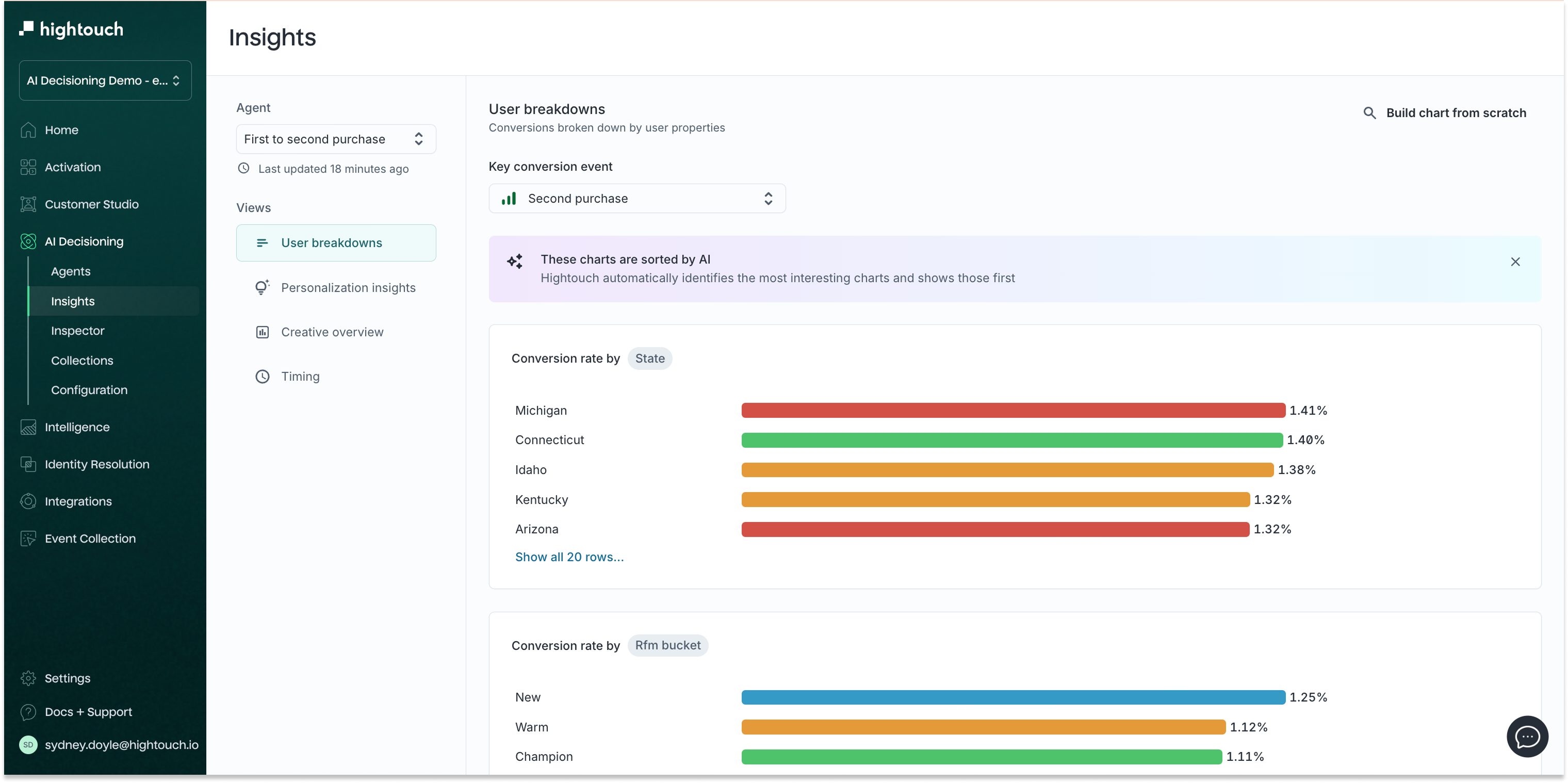
Review agent performance with Insights, which shows conversion breakdowns by audience, creative performance by message or tag, timing insights, and lift metrics. Use the Inspector to preview sends, confirm eligibility, and troubleshoot delivery issues. Before launching, walk through the QA guide for channel-specific validation checklists.
Get started
AI Decisioning requires workspace configuration from data teams before marketers can create agents. This setup is typically done once per workspace.
For data teams and platform admins
Complete these steps in order. Marketers cannot create agents until the workspace is configured and at least one destination is connected.
| Step | What to do | Why |
|---|---|---|
| 1 | Configure workspace settings | Define global eligibility rules, time zones, and channel defaults. |
| 2 | Prepare data for AID | Define audience models, structure event data, and prepare tables for decisioning. |
| 3 | Connect a destination: Braze, Iterable, or Salesforce Marketing Cloud | Connect your ESP or messaging platform so AID can deliver messages. |
Once the workspace is configured and a destination is connected, marketers can start creating agents immediately.
For marketers
Once your data team has configured the workspace, start by creating your first agent. Define a target audience and a single measurable goal — most teams start with one goal like reactivation or first purchase and expand as performance data accumulates.
From there, add messages from your connected destination, define variants, and launch. Use the QA guide to validate before going live, then monitor performance in Insights as your agent learns.
When to use AI Decisioning
Use AI Decisioning for lifecycle or retention campaigns where users may need different messages, channels, or timing based on their behavior. For campaigns where you need full control over sequencing and timing, use Journeys in Customer Studio instead.
| Scenario | Recommended approach |
|---|---|
| Automate which message, channel, and timing each user receives | AI Decisioning |
| Onboard, win back, cross-sell, or retain with adaptive campaigns | AI Decisioning Agents |
| Reduce wasted sends by suppressing low-likelihood-to-convert users | AI Decisioning Smart Suppression |
| Build audiences from warehouse data and sync to destinations | Customer Studio |
| Orchestrate multi-step campaigns with fixed sequencing and branching | Journeys in Customer Studio |
| Measure experiment results and track KPIs | Intelligence |
How AI Decisioning fits into Hightouch
AI Decisioning is the optimization layer of the Hightouch platform. It takes audiences and data from your warehouse and learns how to reach each person most effectively through your connected messaging tools.
What AI Decisioning uses
- Audiences from Customer Studio — Agents target Customer Studio audiences as their eligible population. Audience membership updates automatically as warehouse data changes.
- Event data from your connected source — AID uses behavioral events like purchases, clicks, and app opens as feedback signals to learn what drives conversions.
- Messages from connected destinations — Messages are sourced from your ESP or messaging platform (Braze, Iterable, or Salesforce Marketing Cloud). AID evaluates variants and controls which version is sent — it does not modify your base content.
What AI Decisioning sends
- Optimized sends to destinations — AID delivers the best message, channel, and timing for each user through your connected ESP or messaging platform.
- Performance data to Insights — Conversion breakdowns, creative performance, timing insights, and lift metrics are available for ongoing analysis and refinement.
Use cases
| Use case | Example goal |
|---|---|
| Onboarding | Help new users complete a first purchase or app setup |
| Win-back | Re-engage lapsed users with personalized incentives |
| Cross-sell or upsell | Recommend complementary products or upgrades |
| Referral | Encourage existing customers to invite friends |
| Retention | Keep engaged users active with timely, relevant messages |
Each agent focuses on a single measurable outcome and continuously improves performance over time.
Permissions
Access to AI Decisioning is controlled through the Agents tab in the custom role builder. Users need the Access Agents grant to view AI Decisioning in the app, and the Configure Agents grant to modify agent settings. See Roles for details.