| Audience | How you'll use this article |
|---|---|
| Marketing | Understand what Customer Studio does and how you'll use it day-to-day to build audiences, run campaigns, and measure results. |
| Data teams | Understand the schema and source setup your marketers depend on, and how Customer Studio connects to the rest of the Hightouch platform. |
Customer Studio is a visual workspace for building audiences and orchestrating campaigns using data from your warehouse. Marketers define who to target, how to reach them, and when — then sync audiences to ad platforms, CRMs, and messaging tools without writing SQL.
What you'll learn
- What Customer Studio is and what problems it solves
- How to access Customer Studio
- Core features: audiences, campaigns, and measurement
- How to get started, by role
- When to use Customer Studio
- How Customer Studio connects to other Hightouch products
Overview
Customer Studio gives marketers direct access to warehouse data through a visual interface. Instead of requesting lists from data teams or rebuilding segments in every downstream tool, you define audience logic once and activate it everywhere.
Customer Studio handles two related jobs:
- Audience building — Define who belongs in a segment using filters, traits, and event conditions. Preview audience size and composition, then sync membership to destinations like ad platforms, CRMs, and email tools.
- Campaign orchestration — Coordinate how audiences are activated across channels. Build multi-step journeys, manage priority when audiences overlap, run experiments, and measure lift.
Because Customer Studio connects directly to your data warehouse, audiences stay current without manual exports or CSV uploads. Data is not copied or stored unless explicitly configured.
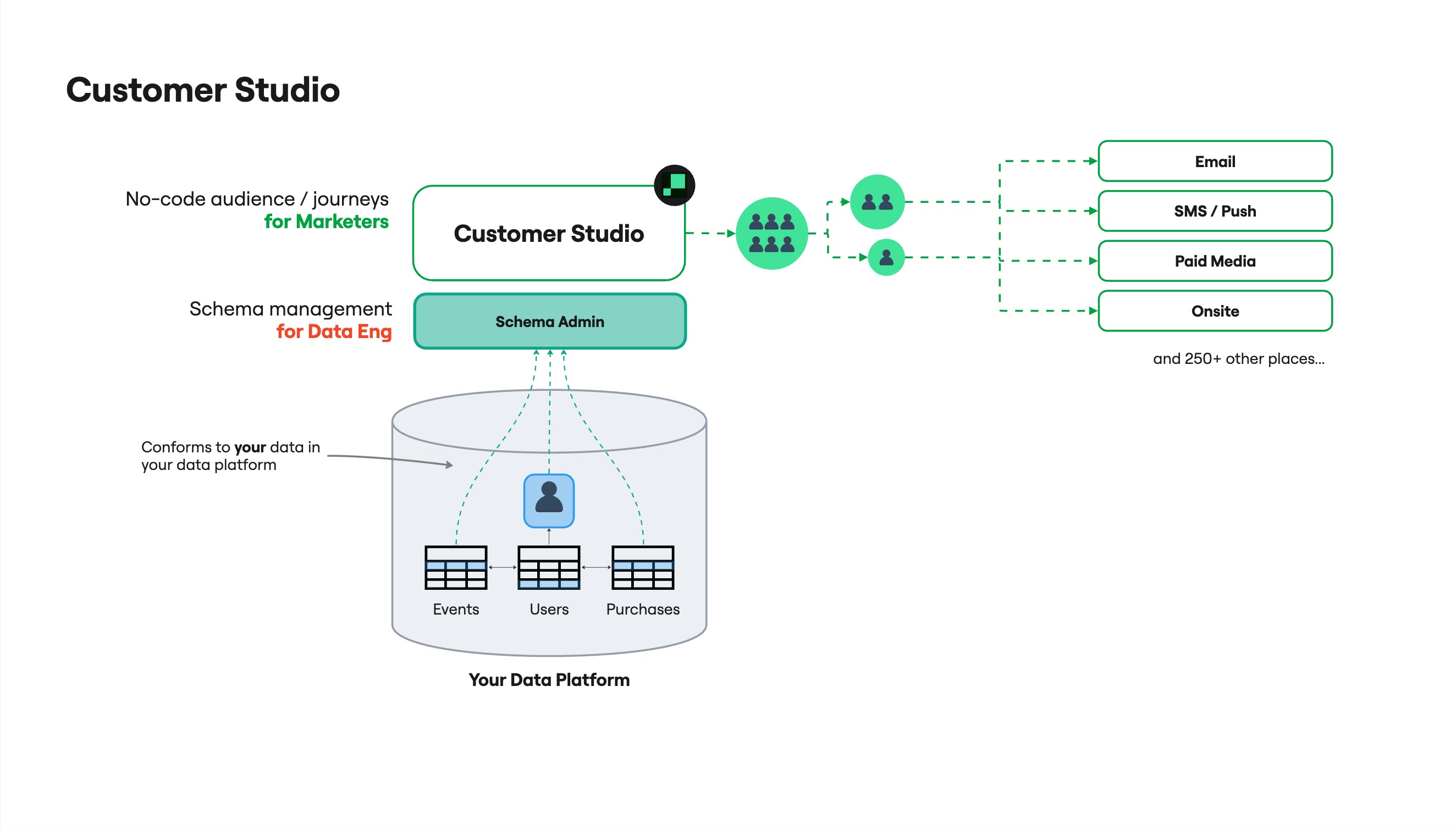
Explore the interactive architecture diagram — see how data flows and where Customer Studio fits in your stack.
Example: Suppress recent buyers from acquisition campaigns
Say your paid media team runs prospecting campaigns on Meta and Google. Without suppression, you spend budget showing ads to people who already converted. In Customer Studio, you build an audience of customers who purchased in the last 7 days, then sync that audience as a suppression list to both ad platforms. The audience updates automatically as new purchases land in your warehouse.
Example: Welcome flow triggered by sign-up
When a new user signs up, you want to send a welcome email immediately, wait three days, then check whether they completed onboarding. If they haven't, send a reminder. If they have, add them to your regular newsletter audience. In Customer Studio, you build this as a journey: an entry trigger based on sign-up events, a delay tile, a conditional branch, and sync tiles that deliver to your email tool at each step.
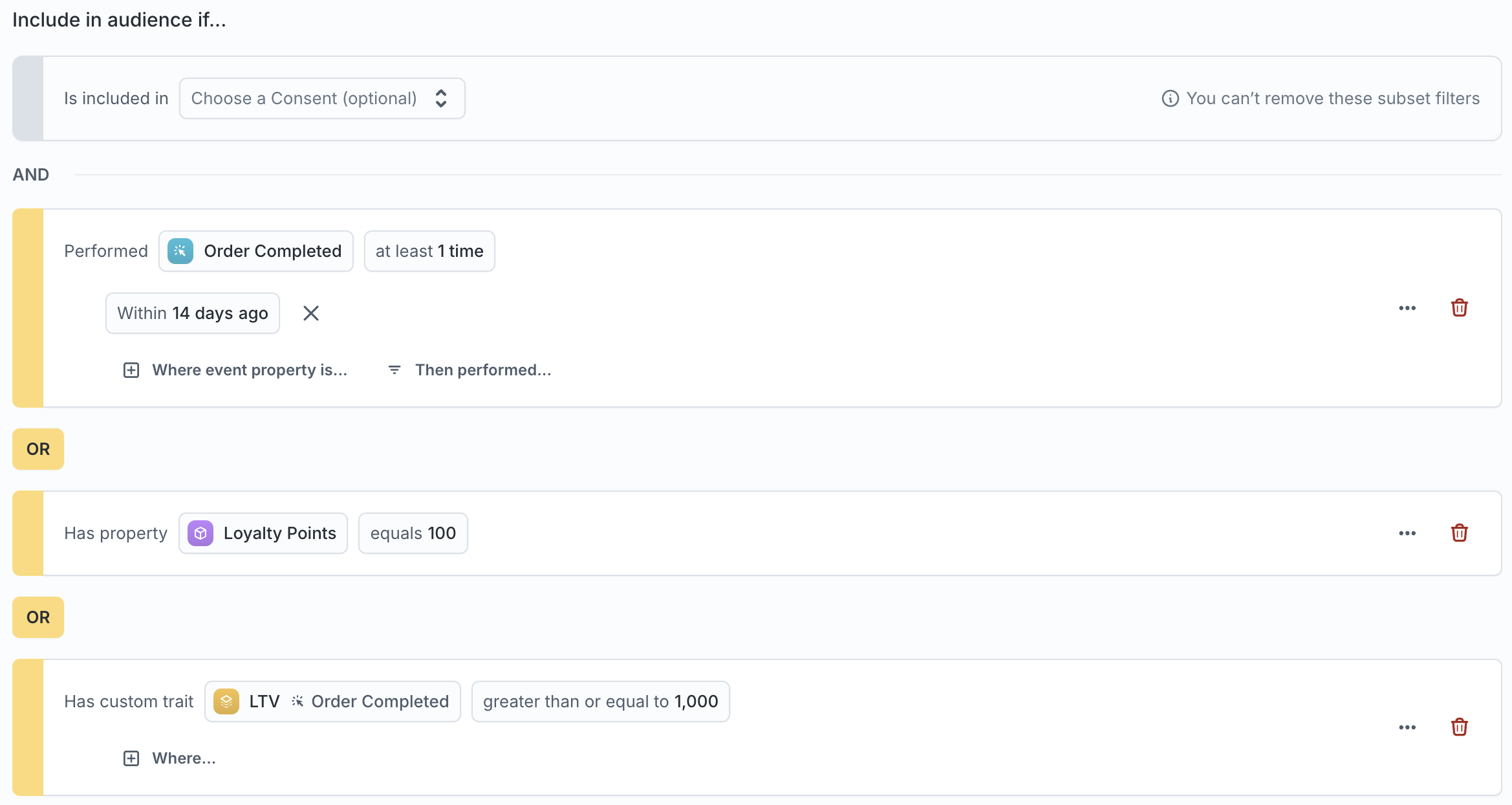
Access Customer Studio
- Go to app.hightouch.com.
- In the left sidebar, click Customer Studio.
Core features
Customer Studio is organized around four areas. Data teams handle initial schema setup; marketers handle everything after that.
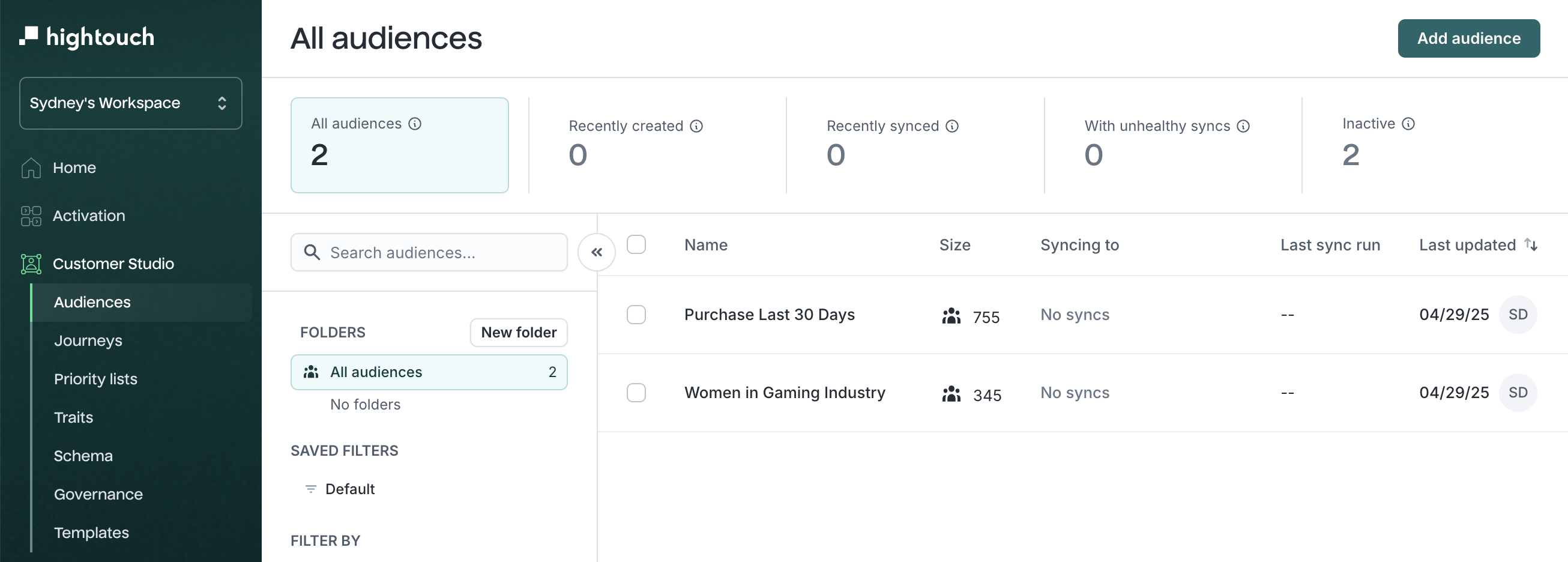
Build audiences
Define who belongs in a segment using the visual audience builder or the AI Agent. Combine filters on user attributes, behavioral events, and computed traits — then preview size and composition before activating.
Activate audiences
Sync audiences to ad platforms, CRMs, email tools, and other destinations on a schedule or in real time. Use destination rules to control when and how each destination receives data.
Orchestrate campaigns
Build multi-step journeys with syncs, delays, conditional branches, and real-time triggers — for welcome sequences, winback campaigns, nurture tracks, and lifecycle messaging. Use priority lists to manage overlap when users qualify for more than one audience, and experiments to run holdout tests and measure incremental lift.
Measure and validate
Use insights to analyze audience composition and overlap, audience dashboards to monitor membership trends, and sampling to spot-check audience members before activating. Save configurations with templates and capture point-in-time records with snapshots.
Get started
Customer Studio requires setup from data teams before marketers can use it. This is typically done once per workspace.
For data teams and platform admins
Complete these steps in order. Marketers cannot build audiences until the schema is configured.
| Step | What to do | Why |
|---|---|---|
| 1 | Connect your warehouse | Customer Studio reads from your data warehouse. At least one source must be connected. |
| 2 | Add destinations | Set up the tools where audiences will be delivered (ad platforms, CRMs, email tools). |
| 3 | Define your data schema | Map warehouse tables (users, events, purchases) into the models marketers use to build audiences. |
| 4 | Enable Lightning Sync Engine (recommended) | Recommended for all supported sources. Required for Journeys, Sampling, Warehouse Sync Logs, and other advanced features. |
| 5 | Enable sampling (optional) | Speed up audience previews on large datasets. Requires Lightning Sync Engine. |
Once the schema is configured, marketers can start building audiences immediately. Governance and consent rules can be added iteratively as your team scales.
For marketers
Once your data team has configured the schema, start by creating your first audience. You can also describe a segment in plain language and let the AI Agent build the audience logic for you.
From there, sync your audience to a destination, then explore journeys, experiments, and insights as your campaigns grow.
When to use Customer Studio
Customer Studio is the right starting point when you need to build audiences from warehouse data and activate them in downstream tools. It's also where you orchestrate campaign logic like journeys, priority, and experimentation.
| Scenario | Recommended approach |
|---|---|
| Build audiences from warehouse data and sync to ad platforms, CRMs, or email tools | Customer Studio |
| Orchestrate multi-step lifecycle campaigns (welcome, winback, nurture) | Customer Studio Journeys |
| Run holdout tests and measure incremental lift | Customer Studio Experiments |
| Optimize which message, channel, and timing each user receives | AI Decisioning — uses Customer Studio audiences as input |
| Measure campaign performance across channels with unified metrics | Intelligence — draws from the same warehouse data and audiences |
| Personalize onsite or in-app experiences in real time | Real-Time Personalization |
| Collect behavioral events from your app or website | Hightouch Events — events feed into Customer Studio as audience filters |
How Customer Studio fits into Hightouch
Customer Studio is the audience and orchestration layer of the Hightouch platform. It reads from your warehouse data and delivers audiences to the tools where campaigns run.
What Customer Studio uses
- Models from your connected source — Data teams define SQL or visual models that map warehouse tables (users, events, purchases) into the schema Customer Studio reads from.
- Resolved identities from Identity Resolution — If you use identity resolution, the Golden Record model can serve as the parent model for your schema, giving marketers a deduplicated view of each customer.
- Real-time events from Hightouch Events — Streaming events like page views, purchases, and app actions can be used as audience filters and journey triggers.
What Customer Studio sends
- Audiences to destinations — Syncs deliver audience membership and traits to CRMs, ad platforms, email tools, and other destinations on a schedule or in real time.
- Audiences to AI Decisioning — AI Decisioning agents use Customer Studio audiences as their eligible population, then optimize which messages each user receives.
- Analytics to Intelligence — Experiment results, audience composition data, and campaign metrics in Intelligence draw from the same warehouse data and audiences defined in Customer Studio.
Manage data governance
Customer Studio includes tools for controlling what data reaches destinations and who can access it.
- Subsets — Scope which records can be synced to certain destinations by region, subscription status, or compliance flags.
- OneTrust integration — Automatically exclude opted-out users from audience syncs using your OneTrust consent data.
- Data masking — Redact or hash PII fields before they reach destinations.
- Configure Schema Git Sync — Version-control your schema configuration with Git Sync.
Supported sources
Only the following sources support Customer Studio:
- Snowflake
- Databricks
- Google BigQuery
- Amazon Redshift*
- Amazon Athena
- Azure Synapse
- MS SQL Server
- PostgreSQL
- Greenplum
- Microsoft Fabric
* Customer Studio may not work with Amazon Redshift Spectrum due to its limitations around nested data. To mitigate these, you can try to query a materialized view during your parent model setup.
Permissions
Access to Customer Studio features is controlled through custom roles. Admins can configure Customer Studio-specific grants in the Customer Studio tab of the custom role builder, including access to parent model data, audience creation, journey configuration, and journey publishing. See Roles for the full list of grants.