Overview
Campaigns is the channel-level reporting surface in Intelligence, covering Emails, Ads, and SMS. It requires a specific schema configuration using interaction models and asset models.
This page covers how to set up your schema for Campaigns and provides entity relationship diagrams for each channel type.
Set up your schema for Campaigns
Campaigns requires a parent model with interaction models configured in your schema. A standard parent model with only event and related models is not enough — the Campaigns page will show a "configure a parent model" warning until this is done.
| Step | What to do | Why |
|---|---|---|
| 1 | Go to Customer Studio, then Schema and select your parent model. | Campaigns reads from the same schema as the rest of Customer Studio. |
| 2 | Add an event model as a relationship from the parent model, then set its Event type to a specific interaction type (for example, Email Delivered, Sessions, or SMS Sent) rather than leaving it as Generic. | Setting a specific event type converts the event model into an interaction model, which is what Campaigns requires. |
| 3 | (Optional) Relate the interaction model to an asset model that represents the campaign content — such as which email, ad, or SMS message was sent. | Asset models enable Campaigns to break down reporting by individual campaign content, not just by channel. |
The Campaigns page shows tabs for Emails, Ads, and SMS. Which tabs appear depends on which interaction types you've configured in your schema. For example, configuring an Email Delivered interaction model enables the Emails tab.
Model types
Campaigns uses two main model types: Events (interaction models) and Assets. The sections below describe each model type and provide schema diagrams.
Events
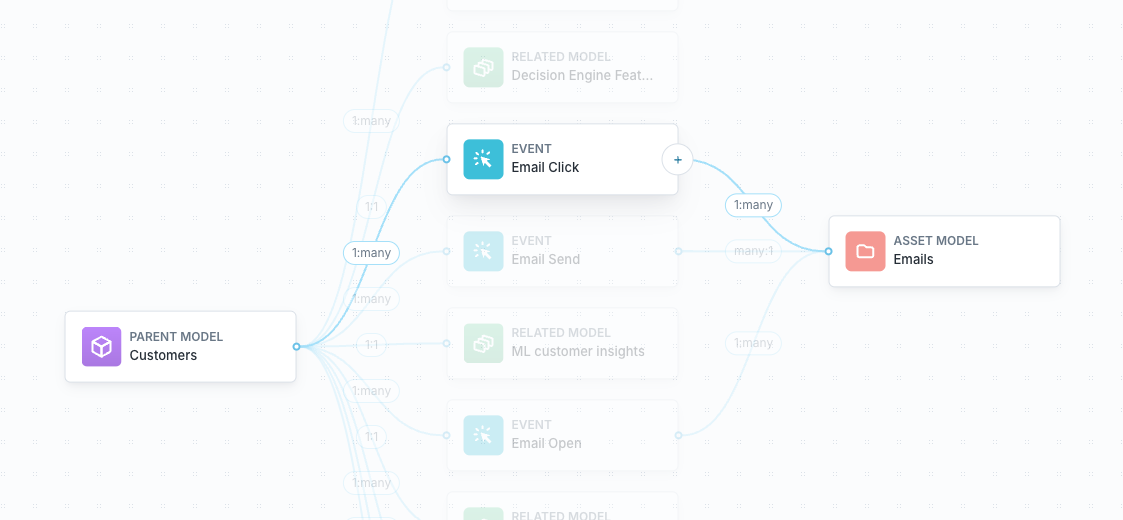
Events connect a user to an asset model. Events require:
- a timestamp
- a relationship with a parent model
- a relationship with an asset model
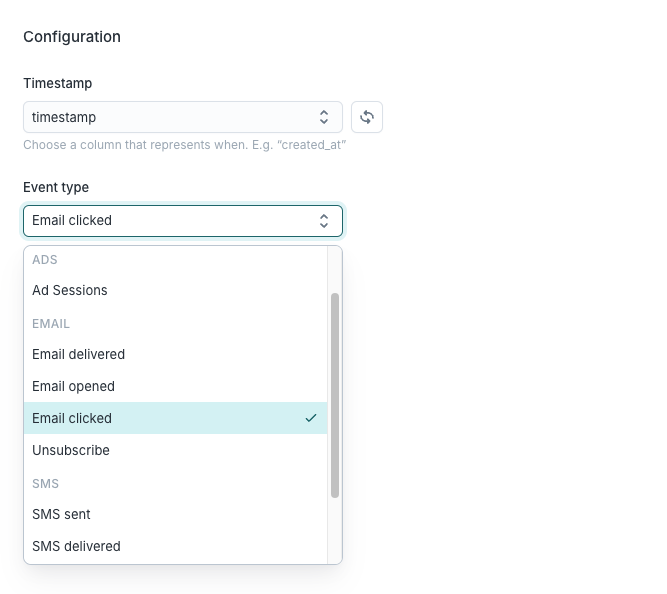
Apply one of the standard Event types to an Event to populate the default metrics on the various asset dashboards of the Campaigns page. We will add more Event types over time.
Assets
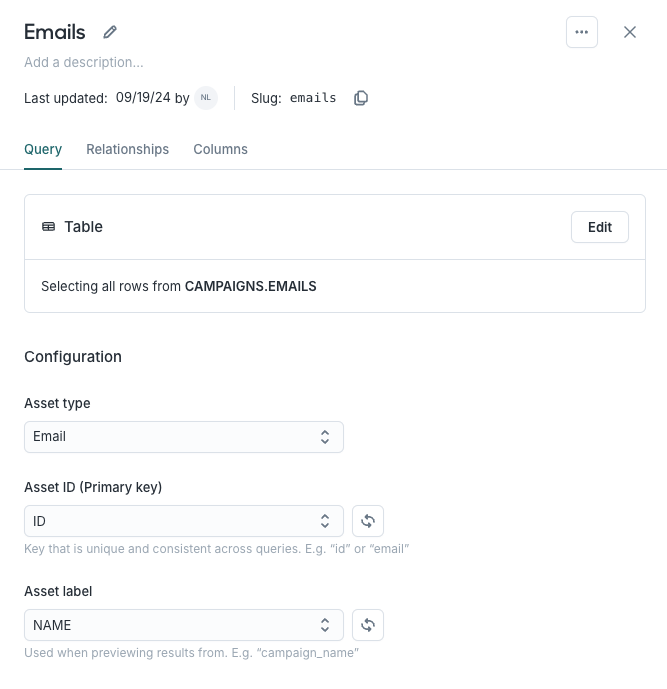
Assets are the most granular elements of a campaign. For paid channels this might be ads and for lifecycle marketing this might be an email or even a variant.
We support the following Asset types:
- Emails
- SMS
- Ads
Message assets
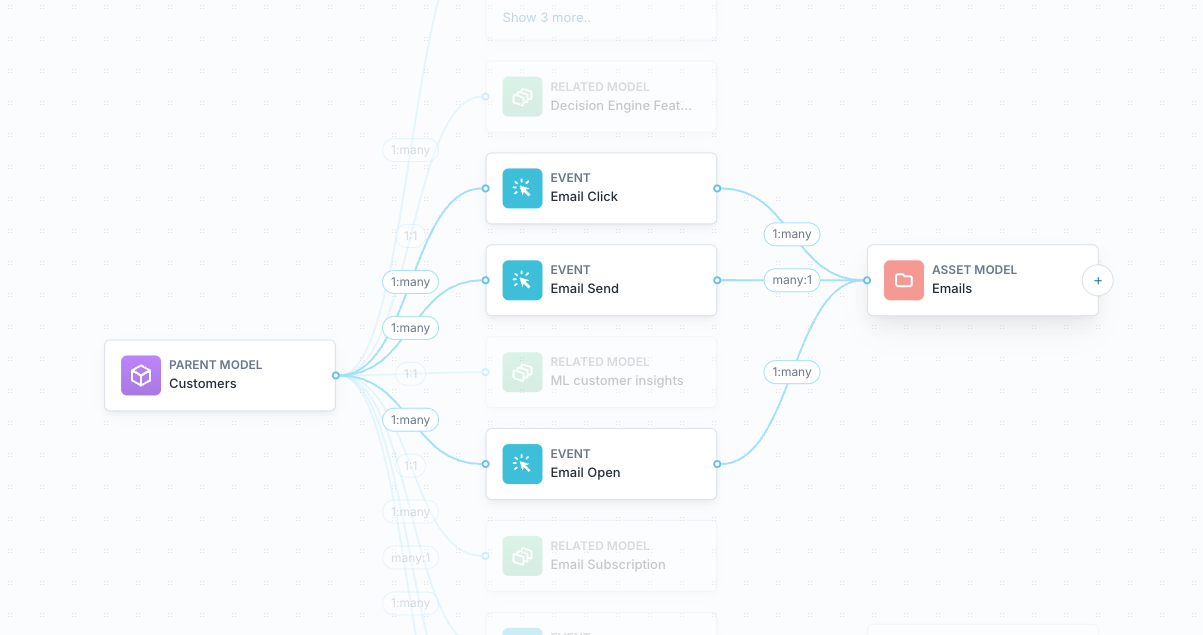
Campaigns for messages, such as emails and SMS, leverages three types of models:
- Users are the parent model.
- Events are events that connect users to an asset, such as email clicks or opens.
- Emails are a type of asset.
Schema
In the entity relationship diagram (ERD) below, we show a schema for messages using emails as an example. The ERD shows expected model columns and their relationships, with necessary primary (PK) and foreign keys (FK).
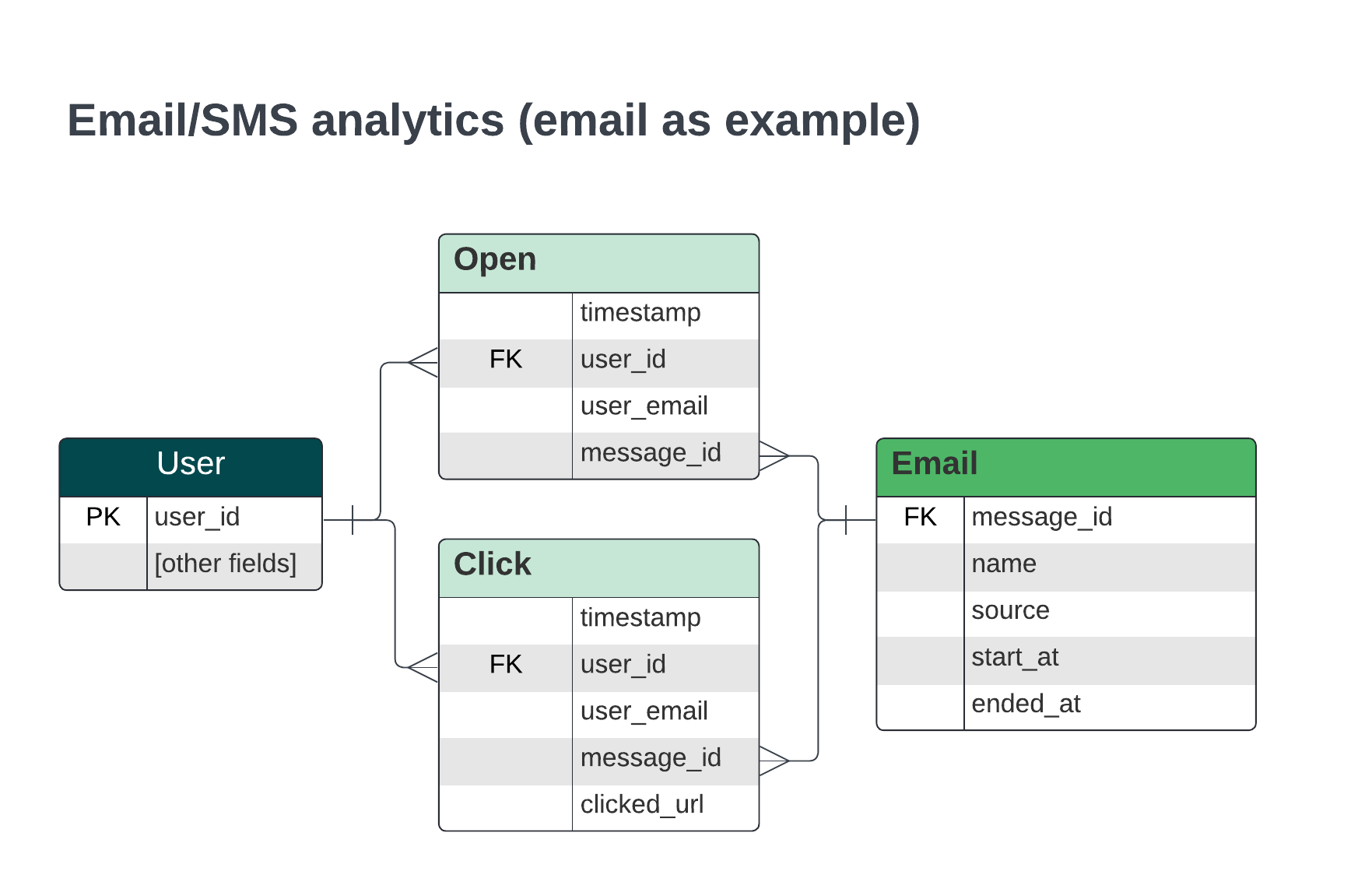
In the ERD above, Users are connected to different Events -- such as email opens and clicks -- through a unique user_id. Events require a timestamp. They can have additional columns based on the Event type, such as a clicked_url for email click events.
Each Event is also linked to an Asset model, either email or SMS, by way of a message_id. The message can have a variety of columns, including date columns such as start_at and ended_at to indicate the dates that email asset was in use.
Ad assets
Campaigns for ads leverages four types of models:
- Users are the parent model.
- Sessions are a type of Event and connect a user to an ad. They necessarily have a timestamp and typically include
utmparameters. - Ads are a type of Asset, and minimally include campaign and platform information.
- Ad stats is a model that indicates engagement with an ad, such as clicks, impressions, and spend. It should fit the format of this dbt model.
The relationships between these models depend on whether your ad model has information about the ad itself, such as an ad_name or ad_group_id alongside the ad campaign information or just campaign information.
Below are entity relationship diagrams (ERDs) that show expected columns and relationships in both situations, including necessary primary (PK) and foreign keys (FK). We note differences between the schemas.
Schema with only campaign data for ads
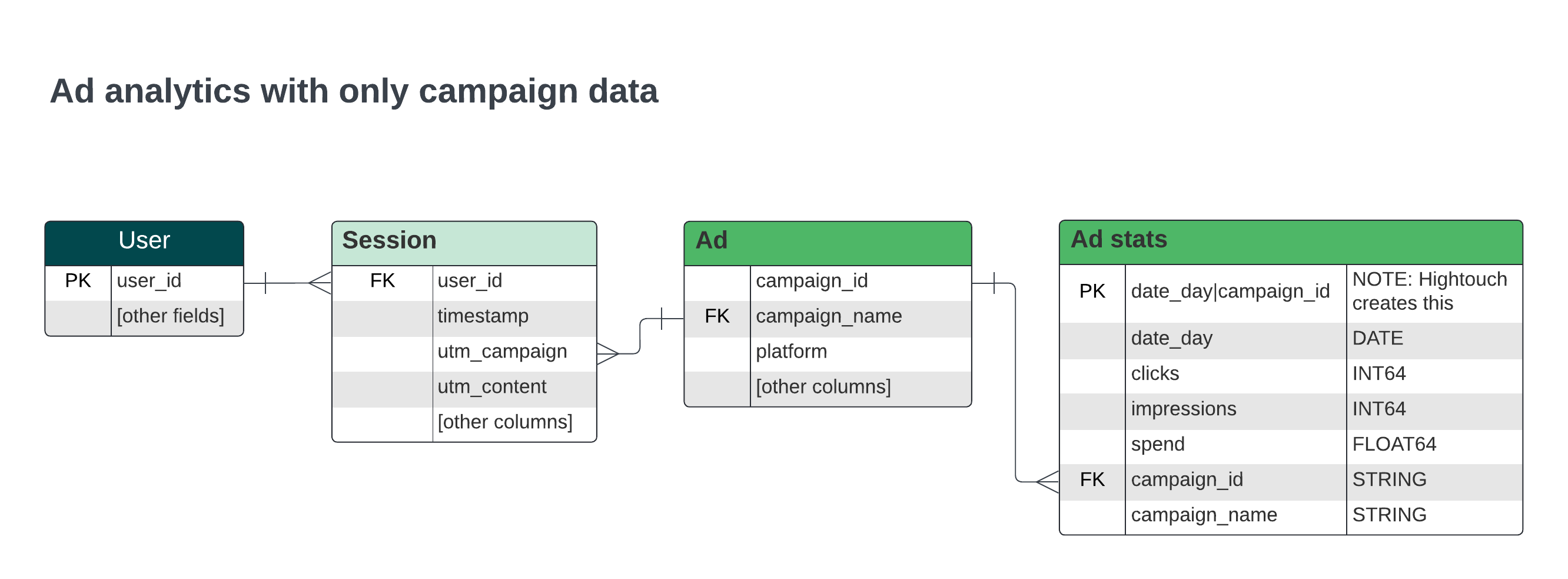
The ERD above includes the important features:
- Sessions connect to Ads with a campaign identifier based on what's available in the session, in this case through a mapping from
utm_campaigntocampaign_name. - Ads also connect to Ad stats through a campaign identifier, in this case the
campaign_id. - Hightouch generates a primary key in the Ad stats model that combines the
date_dayandcampaign_idcolumns.
Schema with ad, ad group, and campaign data
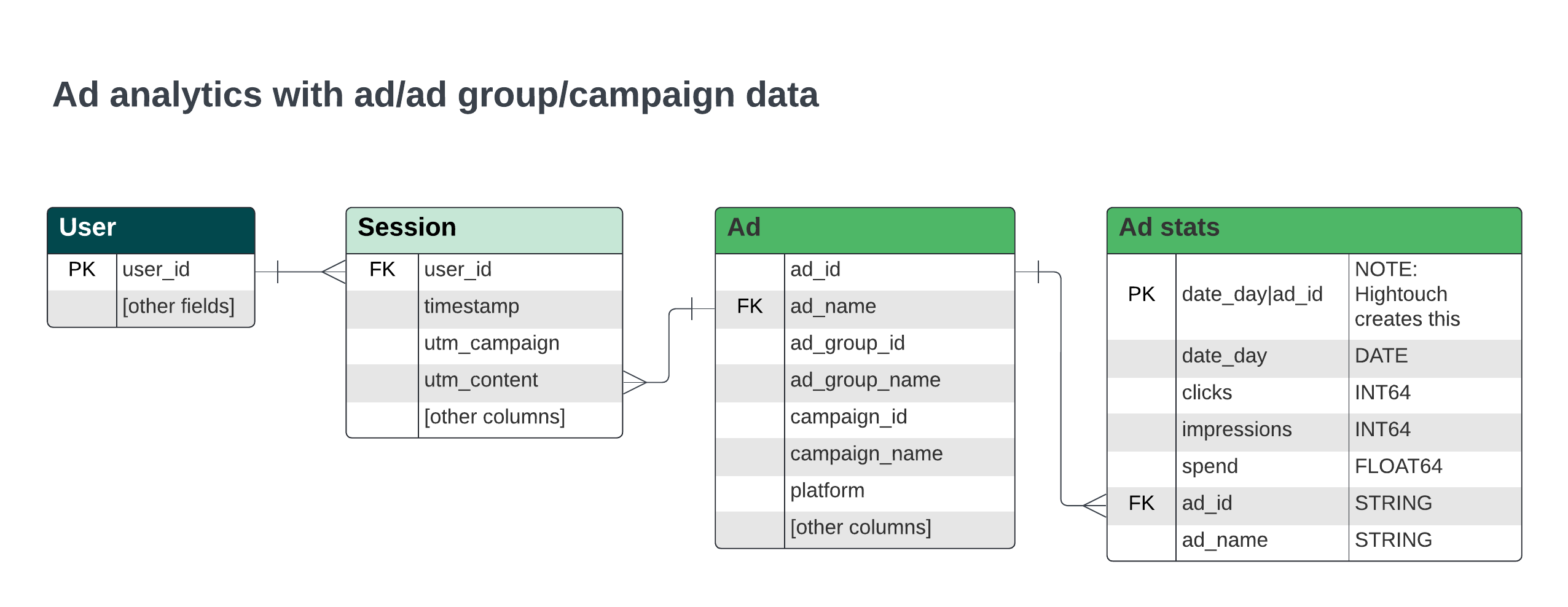
Two notable differences in the schema are evident when there is additional ad and ad group information.
- Sessions now connect to Ads through an identifier at the level of an individual ad, in this case with a mapping from
utm_contenttoad_name. - Ads also now connect to Ad stats through an individual ad level identifier, here the
ad_id. - Both Ads and Ad stats have additional columns for individual ad level information.