
Improve product adoption and reduce churn by enriching ClientSuccess with rich, up-to-date customer data from your data warehouse
Overview
This integration allows you to sync Clients, Contacts and Subscriptions from your warehouse to ClientSuccess.
Setup
To enable syncing with ClientSuccess first you need a username and a password for a user to perform the API calls on your behalf.
Then copy these values, and create a new Destination in Hightouch, selecting Client Success as the destination type. Lastly, paste the values into the configuration form. Save the destination and it's ready to start syncing data.
Syncing
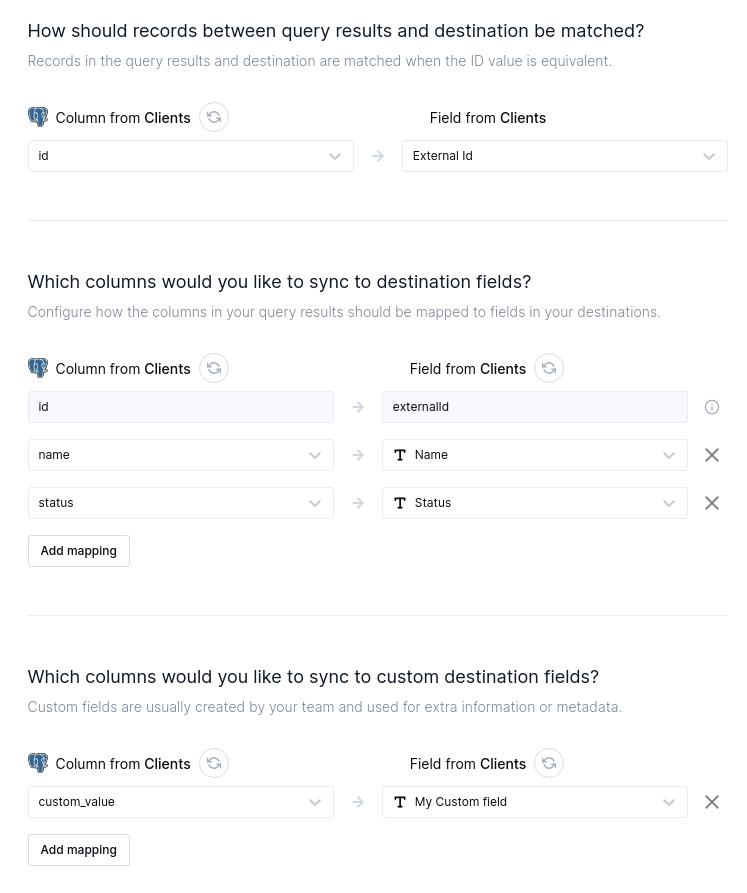
When creating a sync, first you need to select the type of object you want your data to be transformed into. Following that, you could define the ID column and the rest of the mappings.
If you have custom-defined fields in your account, they will appear as mappings, with the appropriate data type.
Tips and troubleshooting
Common errors
To date, our customers haven't experienced any errors while using this destination. If you run into any issues, please don't hesitate to . We're here to help.
Live debugger
Hightouch provides complete visibility into the API calls made during each of your sync runs. We recommend reading our article on debugging tips and tricks to learn more.
Sync alerts
Hightouch can alert you of sync issues via Slack, PagerDuty, SMS, or email. For details, please visit our article on alerting.